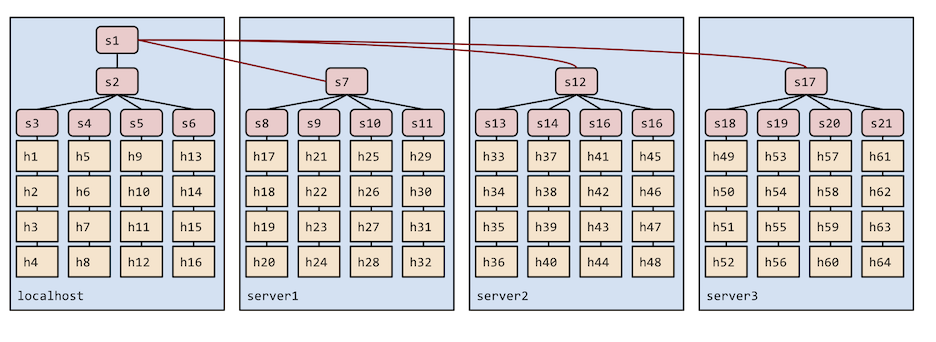
This release provides a number of bug fixes as well as new features,
including support for Python 3 (as well Python 2) and installation
from source on Ubuntu 20.04 LTS as well as Debian 10+.
Mininet is an open source project,
and we are grateful to our many
code contributors, bug reporters, and active users who continue to
help make Mininet a useful system with a friendly and helpful
community.
We look forward to seeing what you will do to
transform and improve the networking world.
Congratulations to the authors, Bob Lantz, Brandon Heller, and Nick
McKeown, and congratulations and thanks to the many researchers,
teachers, students, users, collaborators, and project contributors who
have used and continue to use Mininet to help usher in the SDN
revolution and improve the practice of computer networking!
Congratulations to Alexander Jung, Michał Król and Torsten Runge, who
prototyped a Mininet node class for launching unikernels - small
application-specific kernel images, basically an application linked
with a library OS, ClickOS being one example - and ended up placing in
the SIGCOMM 2018 Hackathon!
“The ACM SIGCOMM SOSR Software Systems Award is given to an individual
or an institution to recognize the development of a software system
that has had a significant impact on SDN research, implementations,
and tools. The impact may be reflected in the widespread adoption of
the system, or of its underlying concepts, by the wider SDN community,
either in research projects, in the open-source community, or
commercially.”
The award also includes an invited talk, and the talk slides may be found
here.
The SOSR 2017 program and proceedings may be found here.
Mininet’s ongoing success and impact would not be possible without the
support and contributions from the Mininet community, so we’d like to
take this opportunity to thank everyone and to say that we look
forward to working together to continue to make Mininet a better and
more useful system!
Unfortunately, installing the Ubuntu SSH package into a VM image causes default SSH keys to be generated. In the case of the Mininet VM, this means that the VM images for Mininet 2.2.1 and earlier included the same set of default SSH keys (which could leave you open to a MITM attack.) This probably isn’t surprising to many of you, but we’re changing it in the Mininet VM images to avoid this issue.
As of Mininet 2.2.2, we no longer ship default SSH keys in the provided Mininet VM; we remove them before upload, and new SSH keys should be generated the first time you boot a Mininet 2.2.2 VM image.
If you are logging into an older Mininet VM over the internet or another non-secure network, we highly recommend regenerating your SSH keys if you haven’t done so already:
Mininet 2.2.2 is primarily a performance improvement and bug fix release.
Security Advisory!
The Mininet VM images no longer ship with identical ssh keys. We recommend that you
destroy any default ssh keys in existing Mininet VMs if you haven’t already:
We use our own forked versions of oflops and the Stanford Reference
Switch/Controller
install.sh now has basic support for RHEL
mnexec now works on systemd systems
The default OpenFlow port is now the official port of 6653 rather
than the classic port of 6633, which was nastily co-opted by Cisco.
Several issues with the NAT element have been addressed
Bugs and Gotchas
Ubuntu 16.04 LTS (Xenial) kernel bug: the problem resulting
in unregister_netdevice: waiting for lo to become free. Usage count
= 1 in the console or kernel log has returned. We recommend using 14.04
or an older kernel until this is fixed.
Ryu installation with install.sh -y is still broken
The --tests option is slightly different from mainline
Thanks to all of the contributors of fixes and enhancements for this
release, including Olivier Tilmans, Jono Hart, Tomasz Buchert, Rahman
Pujianto, Roan Huang, M S Vishwanath Bhat, Brian O’Connor, and others.
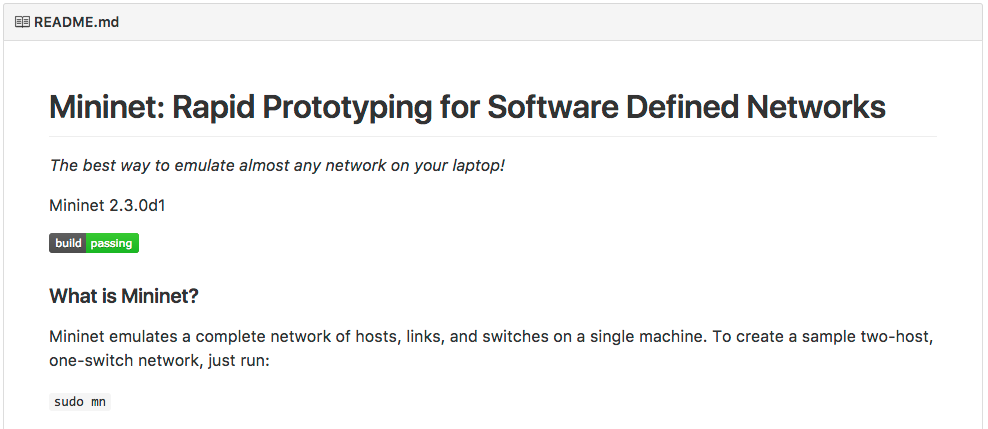
Mininet is now using Travis CI for automated testing!
Whenever code is pushed to Mininet, Travis CI starts a test job
that installs Mininet, runs a simple sanity test, and the “quick”
tests for HiFi, the walkthrough, and the example code.
The full results are available on
Travis CI’s Mininet page,
and the status of the most recent master build is part of the README
on Github:
Travis CI also verifies all new pull requests and displays their
build status in the pull request discussion.
Mininet will continue to be tested in several ways on private servers,
but our hope is that having a public-facing CI will give members
of the community a better sense of how Mininet is tested and the quality
of the codebase.
Furthermore, we hope that by automatically testing pull requests, we
will reduce the likelihood of merging broken code and reduce the
testing burden on maintainers.
Mininet 2.2.1 is primarily a performance improvement and bug fix release.
Batch startup has been implemented for Open vSwitch, improving
startup performance.
OVS patch links have been implemented via OVSLink and --link ovs
Warning! These links have serious limitations compared to
virtual Ethernet pairs: they are not attached to real Linux
interfaces so you cannot use tcpdump or wireshark with them;
they also cannot be used in long chains - we don’t recommend more
than 64 OVSLinks, for example --linear,64. However, they can offer
significantly better performance than veth pairs, for certain
configurations.
Also:
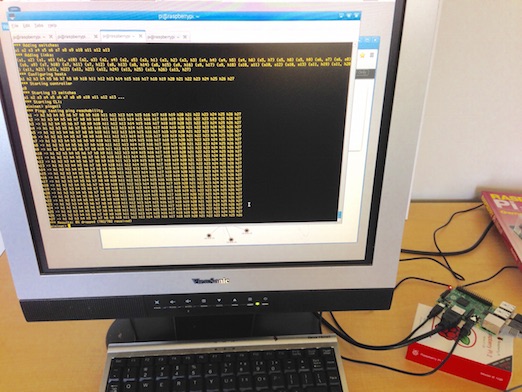
You can now easily install Mininet on a Raspberry Pi
(simply by using install.sh -fnv or install.sh -a) ;-)
mn now accepts multiple --controller arguments
--controller remote and RemoteController now accept ip arguments
of the form <IP address>:<port> (in addition to ip=<IP>,port=<port>)
Additional information for this release and previous releases
may be found in the Release Notes
on docs.mininet.org.
The easiest way to get started with Mininet is to download a
VM image.
We are pleased to announce Mininet 2.2.0! This release provides
a number of bug fixes as well as several new features, including:
Improved OpenFlow 1.3 support
mn --switch ovs,protocols=OpenFlow13 starts OVS in 1.3 mode
install.sh -w installs 1.3-compatible Wireshark dissector using
Loxigen
install.sh -y installs the Ryu 1.3-compatible controller
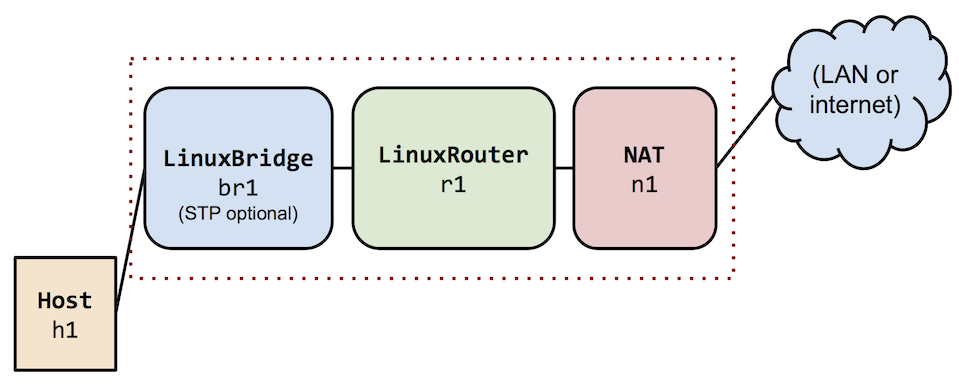
A new nodelib.py node library, and new Node types including
LinuxBridge, OVSBridge, LinuxRouter (see examples/) and NAT
Easier LAN/internet connectivity from Mininet hosts
mn --nat will semi-automatically connect a Mininet network
to your LAN using NAT, solving the “why can’t I ping
Google?” problem.
Warning: By default this will reroute local
traffic originating at your Mininet server or VM and destined for
Mininet’s IP subnet (10.0.0.0/8 by default) to the
Mininet network, which can break connectivity if you are using
addresses in the same range in your LAN. You can change this range
using the --ipbase option.
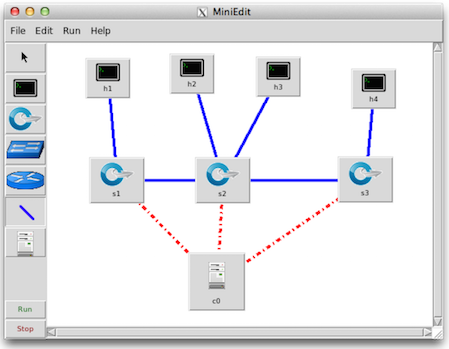
An improved MiniEdit GUI (examples/miniedit.py) - thanks to
Gregory Gee
Experimental cluster support - consult the
documentation for details -
as well as examples/cluster.py and an experimental --cluster
option for topologies built with the default Host and OVSSwitch
classes:
Note that examples contain experimental features which might
“graduate” into mainline Mininet in the future, but they should
not be considered a stable part of the Mininet API!
How to get it
The easiest way to get started with Mininet is to download a
VM image. See http://mininet.org/download
for details.
Mininet is an open source project, and we are grateful to our many
code contributors, bug reporters, and active users who continue to
help make Mininet a useful system with a friendly and helpful
community!
Have fun with Mininet!
Mininet 2.2.0 Core Team:
Bob Lantz, Brian O’Connor, Cody Burkard
Open Networking Laboratory
August 18th, Chicago, USA (in conjunction with SIGCOMM)
Important Dates
Early Registration Deadline: July 11th, 11:59pm CDT
Late Registration: July 12th - August 18th
Tutorial Date: August 18th 8:30am - 12:00pm
Objective
Sharing our experiences using the Mininet network
emulation platform to teach computer networking in a variety of
contexts ranging from small on-campus courses (Stanford, Georgia Tech,
MIT) to massive online courses. We believe that the Mininet platform
can make teaching and learning computer networking more fun and
effective by facilitating experiential learning.
Program
Introduce Mininet to the broader network community, including its capabilities and limitations and some example use cases.
Familiarize attendees with Mininet through hands-on exercises.
Share our experiences using Mininet since 2011 for on-campus and massive online courses at Stanford, Georgia Tech and MIT.
Disseminate assignments that we used at our universities and help to develop and expand an online repository of Mininet courseware.
We are pleased to announce the immediate availability of Mininet 2.1.0
on mininet.org !
Mininet is a network emulation platform that is intended
to be the quickest, easiest, and most enjoyable way to create virtual networks
for research, education, and system development. By providing an instant
virtual network on your laptop that can run real application, switch, and
controller code, Mininet also makes it convenient to get started with SDN and
OpenFlow without any additional hardware.
Mininet 2.1.0 provides a number of bug fixes as well as
new features, including:
Convenient access to Mininet() as a dict of nodes
X11 tunneling (wireshark in Mininet hosts, finally!)
Accurate reflection of the Mininet() object in the CLI
Automatically detecting and adjusting resource limits
Automatic cleanup on failure of the mn command
Support for installing the OpenFlow 1.3 versions of the reference
user switch and NOX from CPqD and Ericsson
Preliminary support for running OVS in user space mode
Preliminary support (IVSSwitch()) for the Indigo Virtual Switch
Preliminary support for Fedora in install.sh
A script (util/m) for easily running new shells or commands in nodes
The ability to import modules from mininet.examples
We have provided several new examples (which can easily be
imported to provide useful functionality) including:
Modeling separate control and data networks: mininet.examples.controlnet
Connecting Mininet hosts to the internet (or a LAN) using NAT: mininet.examples.nat
Creating per-host custom directories using bind mounts: mininet.examples.bind
Note that examples contain experimental features which might
“graduate” into mainline Mininet in the future, but they should
not be considered a stable part of the Mininet API!
Additional information may be found in the
Release Notes.
Mininet is an open source project, and we are grateful to our many code
contributors, bug reporters, and active users who continue to help make Mininet
a useful system with a friendly and helpful community!
Have fun with Mininet!
The Mininet 2.1.0 Team
Bob Lantz and Brian O’Connor
Open Networking Laboratory
I just want to put in a recommendation for Nick Feamster’s excellent Software Defined Networking course. It’s free on Coursera, and not only does he do a great job of clearly explaining SDN, network virtualization, and related topics, he has also created some excellent videos explaining the usage, design, and rationale for the Mininet system, which is also being used for programming assignments and labs in the course.
There are also interesting interviews with notable people like Martin Casado, David Clark, and Teemu Koponen. It’s quite excellent, very approachable for anyone who has a basic networking background, and highly recommended:
One of Mininet’s key features is that it makes it very easy to create
a complete virtual network including hosts, switches, links and
OpenFlow controllers. By default, Mininet runs Open vSwitch
in OpenFlow mode, which requires an OpenFlow controller.
As you probably know, Mininet comes with built-in Controller() classes to
support several controllers, including the OpenFlow reference controller
(controller), Open vSwitch’s ovs-controller,
and the now-deprecated NOX Classic.
You can easily choose which one you want when you invoke the mn command:
Each of the above examples uses a controller which turns your OVS switches
into Ethernet bridges (aka learning switches.)
Note that ovsc is easy to install but only supports 16 switches.
You can install the reference controller (patched to support many switches)
using install.sh -f. (As of this writing, you can also install NOX
Classic using install.sh -x.)
The manual way: using remote controllers
But what do you do if you want another controller like POX? Well, one
way is to start up POX (or Beacon, Floodlight, etc.) in another terminal
window and then use --controller remote:
sudo mn --controller remote,ip=127.0.0.1
If your controller is running locally, you can just use
sudo mn --controller remote
You might be asking: is there a way for Mininet to automatically start
up my controller so that I don’t have to do it manually? The answer is,
of course, yes!
The automatic way #1: using the command line
The latest Mininet master branch allows you to change the command and
arguments for --controller ref to invoke another controller as
desired. For example, here’s how you could invoke POX:
With this class saved into pox.py, you can now do the following:
sudo mn --custom pox.py --controller pox
Additionally you can use the custom class in your Mininet scripts:
12345678910111213141516171819
#!/usr/bin/pythonfrommininet.logimportsetLogLevelfrommininet.netimportMininetfrommininet.topolibimportTreeTopofrommininet.cliimportCLI# We assume you are in the same directory as pox.py# or that it is loadable via PYTHONPATHfrompoximportPOXsetLogLevel('info')net=Mininet(topo=TreeTopo(depth=2,fanout=2),controller=POX)net.start()CLI(net)net.stop()
Note that in this custom class we’ve simply changed
__init__, but in a more complicated example you might
wish to change the start() and stop() methods as
well.
We are pleased to announce the availability of Mininet 2.0.0!
In the last few years, the Mininet community has grown from a few users at Stanford to an active mailing list with over 500 members in academia, startups, and industry.
Version 2 (“HiFi”) is a major upgrade that expands Mininet’s scope from functional testing (“does my network control plane work?”) to performance testing (“how well does my custom congestion control perform with 10 Mb/s links?”). New APIs now allow you to create links with specified bandwidths, latencies and loss rates, and to limit the CPU usage of virtual hosts. Using these new features, 37 students in Stanford University’s Advanced Topics in Networking course (CS244) replicated 16 published research experiments; you’re encouraged to browse their stories at The Reproducing Network Research Blog.
More flexible mn command line options, including the ability to specify NOX (and, in the future, POX) modules from the mn command line, and the ability to set link and CPU bandwidth limits
Dynamic link reconnection in OVS (supports migration and mobility emulation)
First-class abstractions/classes for link (Link) and interface (Intf) objects
Interface/link bandwidth limiting support using tc, via TCIntf and TCLink classes
CPU bandwidth limiting supporting both CFS bandwidth limiting and POSIX real-time scheduling, via the CPULimitedHost class
Easier task execution on virtual hosts via the Host.Popen() interface, implemented in mnexec using the setns system call
Easier and faster native installations that can use the latest Open vSwitch packages.
Note that the Topo object has changed somewhat to enable more flexible topology params, and as a result, your old code may need a few changes.
Download and installation instructions are available at http://mininet.github.com/download and Mininet source code may be found at https://github.com/mininet/mininet. We welcome new feature implementations, bug fixes, bug reports, FAQ additions and other contributions, and we look forward to high-quality discussions on mininet-discuss.
Thanks to all the code contributors, bug reporters, and active users who helped make this release possible!
The old website had an obscure, needed-Google-to-find-it address, and was generated server-side, so it could be a bit slow. The new page you’re seeing was built with Octopress and is hosted on GitHub Pages. Since it’s all statically generated pages now, it should load super-quick, and it’ll be easier to add blog entries and do page customization.
Try it out, and let us know what you think!
-The Mininet Team
[Ed.: Apologies for use of the dubious term “website,” rather than the perfectly adequate “web site.”
Perhaps you found us via Google or your favorite “searchsite.”]